
NPMCA field guide · Public tools and downloads
Hire, Train and Keep a Pavement Maintenance Crew
Hire for a defined job your cash and supervision can support. Verify employment obligations, train before live work, and compare every paid hour with the job plan instead of guessing at crew productivity.
Author: NPMCA · Updated · Version 1
Sources are checked; this is general education, not professional advice.
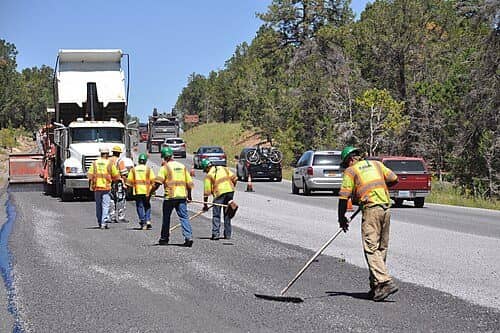
Photo: Grand Canyon National Park / Wikimedia Commons, CC BY 2.0
.jpg)
Before you start
- A repeatable scope and evidence of booked work.
- Current payroll/coverage advice for your state and worker relationship.
- A competent trainer, product SDS and equipment manuals.
What you will finish with
- A role description and lawful hiring process.
- A recorded onboarding/skills matrix and crew-lead handoff.
- A loaded-labor-cost model using your pay and actual burden.
Source note: sources below were checked as of October 11, 2026. Product revisions, local rules and your written quotes control the actual job. Unknown costs stay blank.
Define the first role and why it is needed.
A new worker adds both delivery capacity and a training obligation. Write the work that currently stalls and who will supervise it.
Work backlog, supervision and cash
Use accepted jobs and their payment dates to test the payroll need. Include training and weather downtime. A busy phone or unsigned estimate list is not a payroll commitment.
Driver, prep/application worker or crew lead
Specify driving/transport, pavement preparation, application or lead responsibilities. Separate tasks needing licenses, equipment authorization or demonstrated competence.
Essential skills and realistic job description
State physical/site conditions, actual schedule and essential skills in role-related terms. Identify which skills you teach and which must be demonstrated before hiring.
Verify payroll and worker-classification obligations.
A contract label or tax form does not decide the worker relationship. Get a current determination using the actual facts before setting up payments.
Federal tax and wage tests differ
IRS tax classification examines control and the relationship; DOL wage-law analysis is a separate check. Do not treat one answer as deciding every legal test.
State rules and current changes
Check the state labor, unemployment and workers' compensation authorities and current federal rulemaking/enforcement with a qualified adviser. Proposed changes are not automatically final requirements.
Required employer registrations and work authorization checks
Complete applicable employer/payroll registrations and the current Form I-9 process. Keep identity and payroll records securely in your business system; this public guide collects none.
Build a fair hiring process.
Use the same job-related questions and evaluation record for each applicant.
Honest schedule, duties and pay
State the real starting schedule, duties, pay basis and seasonal uncertainty. Avoid promising year-round hours that booked work and cash cannot support.
Skills demonstrations without unsafe/unpaid job trials
Use a safe, lawful, role-related assessment and check whether compensation is required. Do not put an untrained candidate into customer production or hazardous equipment operation.
Lawful references and role-related checks
Obtain required permissions and check the rules for driving, background and reference checks. Ask about the role's actual requirements instead of private matters unrelated to the work.
Onboard before the first live job.
Teaching, observing and documenting competence are different steps. A signed sheet alone does not demonstrate safe task performance.
Pay/time records
Explain time recording, payroll dates and how to report errors. Maintain accurate required hours and wage records, including applicable nonproduction work; ask your payroll adviser about travel and overtime.
SDS, traffic, heat and equipment training
Use the actual product safety data sheets, closure plan and machine manuals. Include backing/pedestrians, hot material, weather/heat and emergency arrangements appropriate to the assigned tasks.
Demonstrate, observe and sign off competence
Show the task in a controlled setting, have the worker demonstrate it, record limits and assign supervision. Recheck after equipment, product or task changes.
Keep the crew through the season.
Reliability is an operating practice: tell people what work is expected, pay correctly and give timely feedback.
Reliable pay and scheduling
Communicate the next job, reporting time and delay decision. Keep payroll cash obligations visible when the customer pays later.
Clear standards and feedback
Use specific observations: preparation missed, measurement checked, customer closure handled. Agree on the correction and a follow-up check rather than blaming a person for an unclear standard.
Progression to lead
Give a developing lead authority for the job packet, stop-work call, changes and customer communication only after the corresponding skills are demonstrated.
Off-season communication
Discuss expected layoff, reduced hours, winter work or training honestly and verify local requirements. A conversation is not a promise of future work.
Compare labor estimates with actuals.
The bid needs paid labor cost, while the job plan also needs a realistic picture of productive task time.
Paid hours versus job production time
Track loading, travel, briefings, prep, application, cleanup, training and other paid time separately. Do not divide the total payroll cost only by hours spent holding an application tool.
Training, travel, rework and payroll burden
Loaded hourly cost = wages plus actual employer taxes, quoted coverage/benefit costs and other included labor costs, divided by the corresponding paid hours. Explain every inclusion; no national burden percentage is inserted.
Supervisor capacity
Record where the owner or lead had to intervene and the hours it took. Add supervision and rework to the next comparable estimate and second-crew plan.
Prepare and record crew onboarding
Write the role
List the task, work conditions, supervision, schedule and essential skills.
Verify employer obligations
Resolve classification, registrations, coverage, pay records and work authorization through current official instructions.
Prepare the training matrix
List each task, SDS/manual, trainer and observable competence check.
Demonstrate and observe
Train in a controlled setting and record demonstrated skills, restrictions and required supervision.
Explain records and escalation
Show time reporting, pay-error reporting, stop-work and customer/change communication routes.
Save and review the record
Keep signoffs and follow-up dates; revise the matrix when tasks or equipment change.
Public tools
Use these without an account. Enter your own measurements and quotes. Save records on this device or export a copy for your job folder.
Your working record
Records stay in this browser. Export before switching devices. Do not enter bank details, identification numbers or private customer information.
Download the working documents
Version 1 · As of 2026-10-11. PDF for printing; DOCX and spreadsheets for editing. No email or membership required.
Tools you get as an NPMCA member
Confirmed access and plan limits
Optional member resources. Your plan and the member app determine access. The guide and its public tools work without membership.
Available catalog deals
These live catalog resources include practical tools, help and deals. Check each row's eligible plans and terms in the member app.
- PaveCare Navigator
Compare care price options for your membership and location. Confirm the selected service and final price with the provider. This tool is not insurance.
Plans: PaveCarePlus; NPMCA Business PavePro with PaveCarePlus. Catalog checked as of 2026-10-11.
- Deals, Perks & Savings
Browse member offers in NB Deals. Confirm account access and read the selected offer terms.
Plans: PaveCare; PaveCarePlus; NPMCA Business PavePro with PaveCare; NPMCA Business PavePro with PaveCarePlus. Catalog checked as of 2026-10-11.
- Travel — Member Hotel Rates
Member hotel booking with the current phone access shown in the app. Confirm the complete price and cancellation terms before booking.
Plans: PaveCare; PaveCarePlus; NPMCA Business PavePro with PaveCare; NPMCA Business PavePro with PaveCarePlus. Catalog checked as of 2026-10-11.
- More Travel Deals
Travel booking through the phone access listed in the member app. Check current booking terms.
Plans: PaveCare; PaveCarePlus; NPMCA Business PavePro with PaveCare; NPMCA Business PavePro with PaveCarePlus. Catalog checked as of 2026-10-11.
- LotDesk
Keep lots, quantities and proposals in one place. Open LotDesk from the member app home. An active business plan is required.
Plans: NPMCA Business Membership Only; NPMCA Business PavePro with PaveCare; NPMCA Business PavePro with PaveCarePlus. Catalog checked as of 2026-10-11.
- Business Tax Hotline
Help with business tax questions. This benefit does not process payroll or keep your books.
Plans: NPMCA Business PavePro with PaveCare; NPMCA Business PavePro with PaveCarePlus. Catalog checked as of 2026-10-11.
- Small Business Legal Plan
Business legal help under the plan terms. Confirm whether a particular question is covered and ask about fees before work begins.
Plans: NPMCA Business PavePro with PaveCare; NPMCA Business PavePro with PaveCarePlus. Catalog checked as of 2026-10-11.
- Credit & Collections
Tucker Albin referral help with unpaid business invoices. Active PavePro with PaveCare or PavePro with PaveCarePlus membership is required. Check provider terms; recovery is not guaranteed.
Plans: NPMCA Business PavePro with PaveCare; NPMCA Business PavePro with PaveCarePlus. Catalog checked as of 2026-10-11.
PaveCare health benefits are not insurance. Household access is an optional paid add-on. Compare membership plans.
New company offer
Details being finalized
Frequently asked questions
When can I afford my first employee?
Model wages, actual burden, training, supervision and payroll dates against accepted work and cash. There is no universal revenue threshold.
What should I teach before a new hire works on site?
Teach the assigned task, product/SDS and equipment requirements, site traffic, heat/weather decisions, emergencies, time records and stop-work communication, then observe competence.
Can I call a regular crew member a subcontractor?
A label does not settle classification. Review the real relationship under tax, wage-law and state tests with current guidance.
How do I calculate labor cost beyond hourly pay?
Include actual employer taxes, quoted coverage/benefits and other included labor costs on the same paid-hours basis. Keep each assumption visible.
What makes a good crew lead?
Demonstrated task competence plus reliable scope, safety, weather, change-order, customer and closeout decisions. Give authority that matches training.
How can I keep workers through a seasonal schedule?
Pay reliably, communicate changes early, offer specific feedback and discuss realistic off-season options without promises your business cannot keep.
What employment rules should I verify in my state?
Check employer registration, wage/overtime/time records, classification, unemployment, workers' compensation and other role-specific requirements with the responsible authorities.
Related guides
Sources and corrections
- IRS: Independent contractor or employee? · As of 2026-10-11
- DOL Fact Sheet 13: Employment relationship · As of 2026-10-11 · Tax, wage-law and state tests differ. Verify current rulemaking and enforcement before classifying.
- USCIS: Form I-9 · As of 2026-10-11 · Use the current form and instructions; no identity documents are collected by this guide.
- DOL: Wage recordkeeping · As of 2026-10-11
- OSHA: Hazard communication · As of 2026-10-11
- OSHA: Heat exposure · As of 2026-10-11
Found an error or an outdated source? Send NPMCA a correction with the page and source.
Return to the Start a Business guide →